This is the miniature PCB puzzle in the early laboratory. The large player reads the green monitor and sticky note; the small player identifies the slot screws and places the picture cards.
Read shapes, not just colors
| Color | Screw symbol |
|---|---|
| Green | Square |
| Grey | Pentagon |
| Red | Triangle |
| Purple | Star |
| Blue | Y |
| Orange, sometimes yellow-looking | Plus |
Each picture on the monitor has three symbols. Each slot supplies two. Its picture must contain both slot symbols, and each card can be used only once.
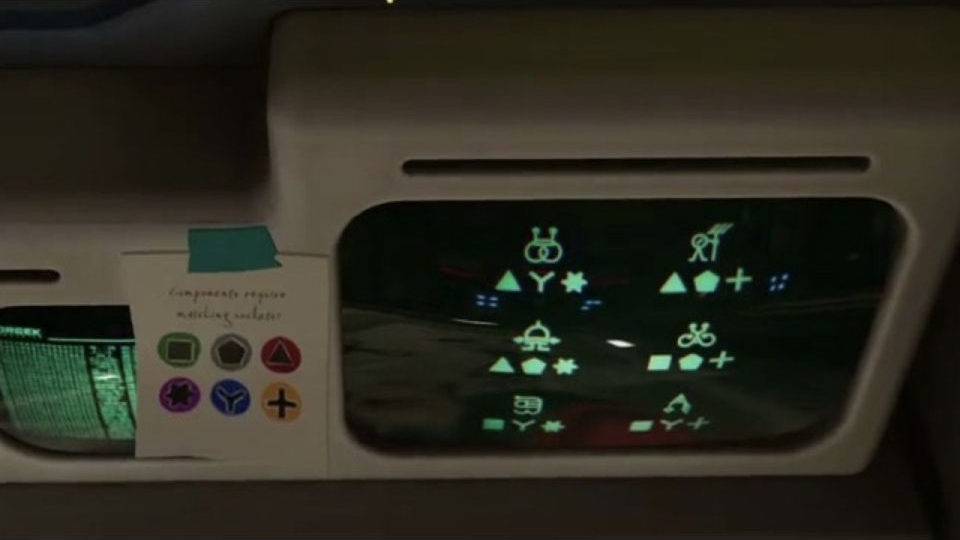
Picture-card matching table
| Slot symbols | Picture to place | Symbols under that picture |
|---|---|---|
| Red triangle + blue Y | Two linked rings | Triangle, Y, star |
| Purple star + grey pentagon | Dome with arms | Triangle, pentagon, star |
| Green square + grey pentagon | Bicycle | Square, pentagon, plus |
| Green square + orange plus | Hooked tent | Square, Y, plus |
| Grey pentagon + orange plus | Small person / rake-like figure | Triangle, pentagon, plus |
| Blue Y + purple star | Box-shaped 3 | Square, Y, star |
Read the screws on your current board rather than following fixed left/right positions from a screenshot.
Place the unique matches first
- Place linked rings in triangle + Y.
- Place dome with arms in star + pentagon.
- Place bicycle in square + pentagon.
- Remove those pictures from consideration, then place the remaining three according to the table.
- Press check after all six are placed.
The linked-rings card also contains Y and star, but spending it on that slot leaves triangle + Y without a valid card. That is why the unique matches come first.
If check does not pass
Reread each slot’s two screw shapes and confirm that you used every picture once. Reposition a wrong card, then check again. Look for the onward passage toward the resin area as a progress check. If your displayed picture combinations differ, apply the same two-symbol matching rule to your monitor.